
Prerequisites
The below prerequisites need to be provided in an email that will be sent to us.
- Add-on configuration URL (optional) If you would like to act on the behalf of an organization, we need this URL so we can redirect the user (organization administrator) to your side after the add-on is activated. There the user will authorize the connection between your add-on and us and initiate the authentication flow. So this is like the entry point to an addon, it can be as simple as a button pointing to our /oauth/authorize endpoint, but you can of course configure everything you add-on needs.
- Add-on redirects URI : is the place where we will always redirect after authorization, this URI should exist on your system and be a valid one. More details are provided below. On this URI we will redirect once with your “authorization code”, and later when you exchange this authorization code for an access token we will again redirect back there. You can also provide multiple redirect URIs.
Register your integration add-on
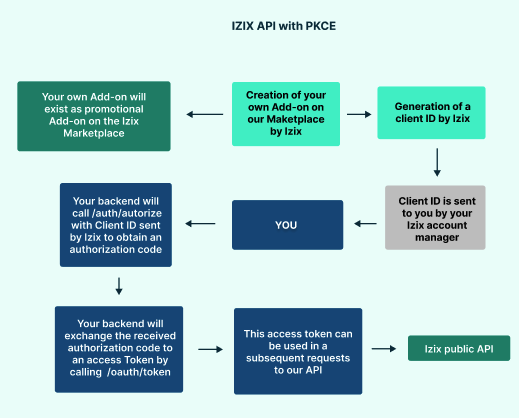
To create a custom integration add-on in the IZIX marketplace, you need:
Request your API Credentials here. Once we receive the necessary information and setup everything on our side, we will contact you, and you can start the integration procedure described in the rest of the document.
Integration with user authorization and PKCE code
Request an authorization code
In order to request an access token to our system, you first need to redirect the user to our platform to obtain an authorization code.
https://auth.izix.eu/oauth/authorize?$params
GET /oauth/authorize?$params
$params = [
    'client_id' => 'the-client-id-provided-by-us',
    'redirect_uri' => `http://your-app.com/callback`,  →explained below
    'response_type' => 'code',
    'scope' => '',                                     →explained below
    'state' => `CSRF-token-ensuring-request-state`,
    'code_challenge' => $codeChallenge,                →explained below
    'code_challenge_method' => 'S256',
    'prompt' => '',                                     →explained below
];
Parameters
Here, $params is just a variable that holds an array of parameters that will be attached to the authorization request URL. Of course this can be achieved also in the standard way like:
GET /oauth/authorize?client_id=the-client-id-provided-by-us
&redirect_uri=<http://your-app.com/callback>
&...
Scope
The scope parameter is optional. The request may have one or more scope values indicating additional access requested by the application. You can find more about what scopes apply to which endpoint into our public api documentation
State
One of the steps to ensure protection of the request is to put state in the session. The state parameter is used by the application to store request-specific data and/or prevent CSRF attacks. The authorization server must return the unmodified state value back to the application.
Code challenge
As we use Authorization Code Grant with PKCE (Proof Key for Code Exchange), we ensure that the request will not be intercepted by an attacker to obtain the authorization code.
The code verifier should be a random string of between 43 and 128 characters containing letters, numbers, and “-“, “.”, “_”, “~” characters, as defined in the RFC 7636 specification.
The code challenge should be a Base64 encoded string with URL and filename-safe characters. The trailing ‘=’ characters should be removed and no line breaks, whitespace, or other additional characters should be present.
Important Note The code challenge is binary encoded, if the same code verifier is encoded using different method (e.g HEX) it will provide different value, which will fail.
More information can be found here and here.
Prompt
The prompt parameter may be used to specify the authentication behavior of the Passport application.
If the prompt value is none, Passport will always throw an authentication error if the user is not already authenticated with the Passport application. If the value is consent, Passport will always display the authorization approval screen, even if all scopes were previously granted to the consuming application. When the value is login, the Passport application will always prompt the user to re-login to the application, even if they already have an existing session.
If no prompt value is provided, the user will be prompted for authorization only if they have not previously authorized access to the consuming application for the requested scopes.
Redirect URI
The redirect_uri is the place where we will redirect with the authorization code, so it is important that this is a correct and existing path. In case of change in the provided URI or invalidity the redirection will fail.
Once we receive the authorization request and ensure we have everything we need and all the information is correct, we will return an authorization code along with the state that we received in the request session.
Request an access token
Once we redirect back based on the provided callback url that we received previously the developer will be able to obtain the authorization code from the request and exchange it for access token in a similar way as below:
POST /oauth/token?$params
$params = [
    'grant_type' => 'authorization_code',
    'client_id' => 'client-id',
    'redirect_uri' => `http://your-app.com/callback`,
    'code_verifier' => $codeVerifierFromSession,    →explained below
    'code' => 'code-returned-from-previous-request',
];
Response:
{
  "access_token": "AYjcyMzY3ZDhiNmJkNTY",
  "refresh_token": "RjY2NjM5NzA2OWJjuE7c",
  "token_type": "Bearer",
  "expires": 3600
}
After this step, this access token can be used in a subsequent requests to our api with the Authorization Header: Bearer followed by the access token as in the example below:
GET /example/endpoint
Authorization: Bearer access-token-value
Request a refresh token
In order to request a new token after expiration you can use the initial refresh token provided by us to request a new one.
POST /oauth/token
Parameters:
{
    'grant_type' => 'refresh_token',
    'refresh_token' => 'the-refresh-token',
    'client_id' => 'client-id',
}
Response:
{
    "access_token": "AYjcyMzY3ZDhiNmJkNTY",
    "refresh_token": "RjY2NjM5NzA2OWJjuE7c",
    "token_type": "Bearer",
    "expires": 3600
}
Unpublishing your integration
If an organization decides that it no longer wants to use a given add-on and deactivates it, in the background all related client credentials and access tokens will be removed(revoked). If you would like to unpublish the add-on that you’ve created, please contact us [email protected].
Openid Connect
You should use OpenID connect to ensure a user is really who he pretends to be if you use our system to authenticate a user.